
How are you? If you are struggling with a sluggish device, you are not alone. Many users face the issue of a slow phone, particularly in the year 2026. In this article, we will discuss how to fix a slow phone without additional apps, enabling you to optimize your device’s performance with simple tweaks. You’ll find our tips practical and easy to implement.
List of contents:
- Understanding the Causes of a Slow Phone
- Free Up Storage Space for Faster Performance
- Disable Background Processes That Are Not Necessary
- Update Your Phone’s Software Regularly
- Utilize Built-in Device Maintenance Tools
- Settings Adjustment for Enhanced Performance
Now that you have a clear outline of what we will cover, feel free to continue reading! Each section will provide you with useful insights to address that annoying slow phone issue without the need for any additional applications. Remember, understanding the root causes will also empower you to take better care of your device going forward. Let’s dive deeper into each tip and help you reclaim the speed of your phone!
Understanding the Causes of a Slow Phone
A slow phone can be frustrating and can disrupt our daily activities. Understanding the reasons behind a slow phone is crucial to finding effective solutions. Several factors can contribute to the lag in performance, including software issues, hardware limitations, and user habits. Regular maintenance and awareness of these factors can significantly improve your device’s speed.
- Outdated software can affect performance.
- Limited storage space may lead to slow response times.
- Excessive background apps consuming resources.
- Fragmented data on storage devices.
- Malware or viruses that strain system resources.
- Heavy applications that exceed hardware capabilities.
- Poor battery health that impacts performance.
Free Up Storage Space for Faster Performance
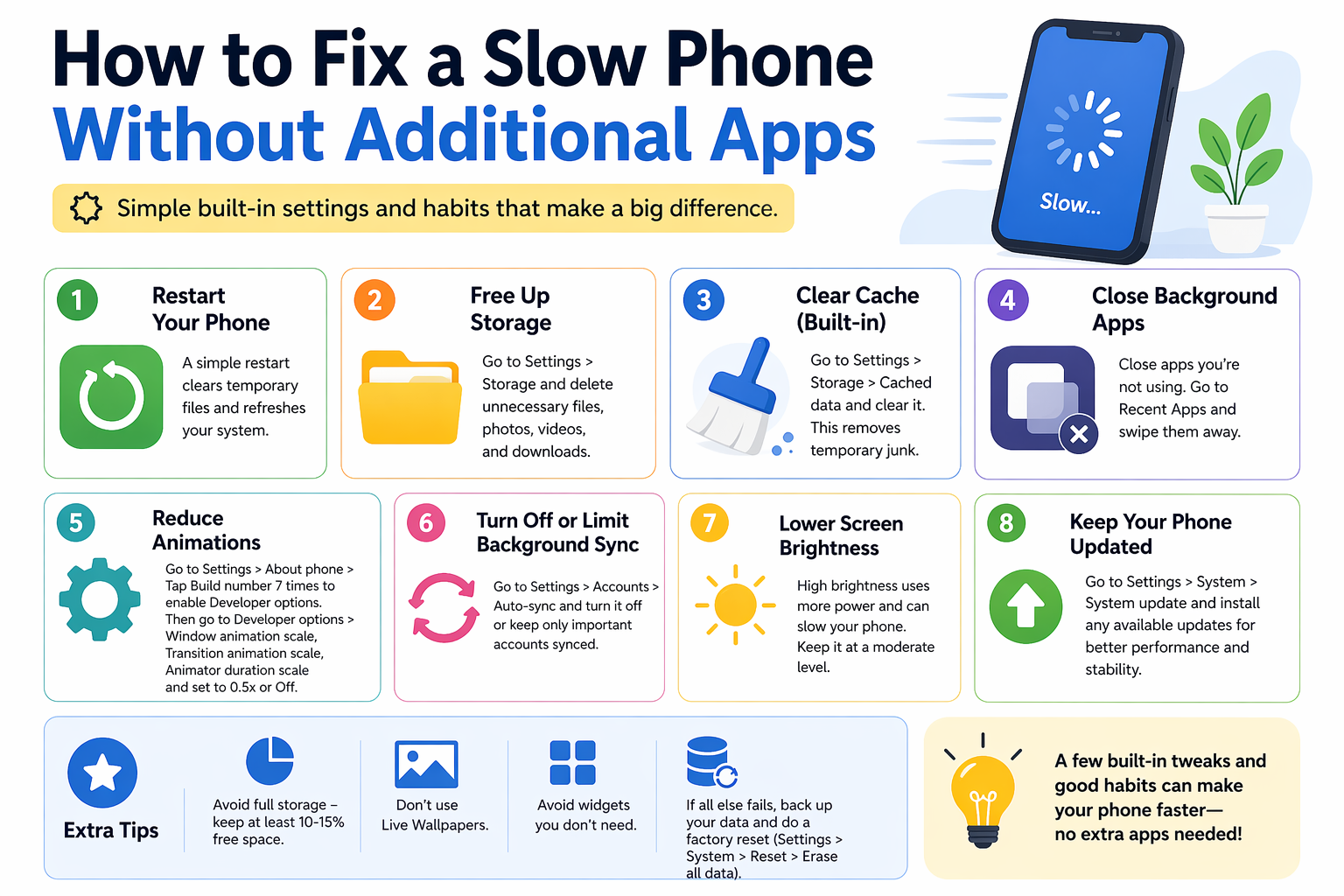
In today’s digital age, a slow phone can be incredibly frustrating, especially when it affects your daily productivity. One effective way to enhance your phone’s speed is by freeing up storage space. Often, phones are bogged down by unnecessary files and apps that take up precious storage. By deleting unused apps and clearing cached data, you can significantly improve your device’s performance. Additionally, consider transferring photos and videos to cloud storage to further free up space.
Comparative Analysis of Storage Management Options
| Method | Advantages | Disadvantages |
|---|---|---|
| Deleting unused apps | Directly frees up space; improves performance | May lose access to apps you might need later |
| Clearing cached data | Quick and easy cleaning process | Requires frequent repetition; cache will rebuild |
| Using cloud storage | Saves physical storage; accessible from multiple devices | Requires internet access; potential privacy concerns |
Disable Background Processes That Are Not Necessary
One effective method to improve the performance of your phone without installing any additional applications is to disable background processes that are not essential to your daily tasks. Many apps continue to run in the background, consuming valuable resources such as memory and battery life. By managing these processes, you can ensure that your phone operates more smoothly and efficiently. To begin, access your phone’s settings and navigate to the applications section. There, you can identify which apps are running and choose to stop or disable those that are unnecessary, thereby freeing up resources for the apps you use most frequently.
- Why is my phone so slow?
- How can I improve my phone’s speed?
- What are background processes?
- Will disabling apps harm my phone?
- Can I re-enable disabled apps later?
Update Your Phone’s Software Regularly
One of the simplest yet most effective ways to improve your phone’s performance is to regularly update its software. Manufacturers often release updates that contain important optimizations and bug fixes, which can significantly enhance your device’s speed and efficiency.
Benefits of Software Updates
By keeping your phone’s software up to date, you can enjoy various benefits, including:
- Improved device stability
- Enhanced security features
- Faster application load times
- Access to new features
How to Check for Updates
Most smartphones make it easy to check for software updates. Simply navigate to the settings menu and look for the Software Update section. From there, you can manually check for any available updates. It’s recommended to perform this check regularly to ensure you’re running the latest version.
Considerations Before Updating
Before proceeding with a software update, consider the following:
- Ensure your device is fully charged or plugged in
- Back up important data to prevent any loss
- Check available storage space to accommodate the update
Possible Drawbacks of Software Updates
While updating is essential, there can be rare cases where updates may cause issues. It’s wise to monitor your device for any unexpected behaviors post-update. If problems arise, you may need to contact customer support or seek solutions online.
Utilize Built-in Device Maintenance Tools
In 2026, keeping your phone performance optimal is more critical than ever. One of the primary ways to achieve this without downloading additional applications is by utilizing the built-in device maintenance tools that come pre-installed on most smartphones. These tools are designed to help you manage your device’s performance efficiently.
Start by navigating to the settings menu on your phone, where you’ll typically find a section dedicated to device care or maintenance. Here, you can easily perform tasks such as clearing cache, optimizing storage, and managing background apps that may be consuming unnecessary resources.
Additionally, don’t underestimate the importance of keeping your software up to date. Regular updates often include performance enhancements and bug fixes that can significantly improve how your phone operates. By leveraging these built-in features thoughtfully, you can keep your phone running smoothly without the need for third-party apps.
Settings Adjustment for Enhanced Performance
In conclusion, optimizing the settings of your phone can significantly enhance its performance without the need for additional applications. By carefully adjusting the system settings, you can reduce background processes, manage app permissions, and free up storage space—all of which contribute to a smoother user experience. Taking these steps not only improves speed but also extends battery life, making your device more efficient in daily use.
Moreover, regularly checking for software updates and performing periodic cleanups can prevent your device from becoming sluggish over time. Remember that a well-maintained device will always perform better, so make these adjustments a part of your routine. Implementing these simple changes can reignite your phone’s speed and usability.“With just a few adjustments, you can breathe new life into your slow phone and enjoy its full potential.”
For those looking to dive deeper into phone optimization, you can explore the extensive variety of advice available online. Here are some links to broaden your knowledge:
- thank you!