
Quota on All Phones

How are you? In today’s digital world, conserving your internet quota on your Android phone is essential for ensuring that you stay connected without overspending. This article will guide you through effective strategies to help you save your internet quota while using your device. You will learn valuable tips that can make a significant difference in how much data you consume daily. By implementing these strategies, you can enjoy a seamless experience without the worry of running out of data too soon.
Contents:
- Understand Your Data Usage
- Limit Background Data
- Use Data Saving Apps
- Adjust App Settings
- Connect to Wi-Fi Whenever Possible
- Monitor Data Usage Regularly
- Disable Auto-Updates on Apps
- Choose a Suitable Mobile Plan
Feel free to continue reading and discover more about how to manage and save your internet quota effectively. Each section will provide you with comprehensive insights and practical solutions tailored to your needs. By following the advice given, you will not only optimize your usage but also enhance your overall experience on Android devices. Let’s dive into the details and explore the various methods available for you to save that precious internet quota!
Understand Your Data Usage
In today’s digital age, understanding your data usage is critical to saving your internet quota on your Android phone. Many users are unaware of the various factors that contribute to their data consumption. By monitoring your habits, you can make informed decisions to extend your data plan effectively.
Monitor Data Usage
Start by checking your device’s data usage statistics. This feature allows you to see which apps consume the most data. You can access this through the settings menu, and it provides a time frame for tracking.
Restrict Background Data
Many applications use data in the background. Restricting background data for these apps can significantly reduce your total data usage. Navigate to your settings to limit background data access on less important apps.
Use Wi-Fi Whenever Possible
Whenever you have access to Wi-Fi, take advantage of it. This will not only save your mobile data but allow you to download updates and large files without worry.
Choose Low Data Usage Modes
Some apps and browsers offer data-saving modes that compress data before it gets to your device. Utilizing these modes can be a game changer for your data usage habits.
| Understanding Data Quota | Monthly Data Limit | Common Data Consumers |
|---|---|---|
| 1 GB | Basic usage: Browsing and social media | Facebook, Instagram |
| 5 GB | Standard usage: Streaming music and videos | Spotify, YouTube |
| 10 GB | Heavy usage: Regular streaming and downloads | Netflix, gaming apps |
Limit Background Data
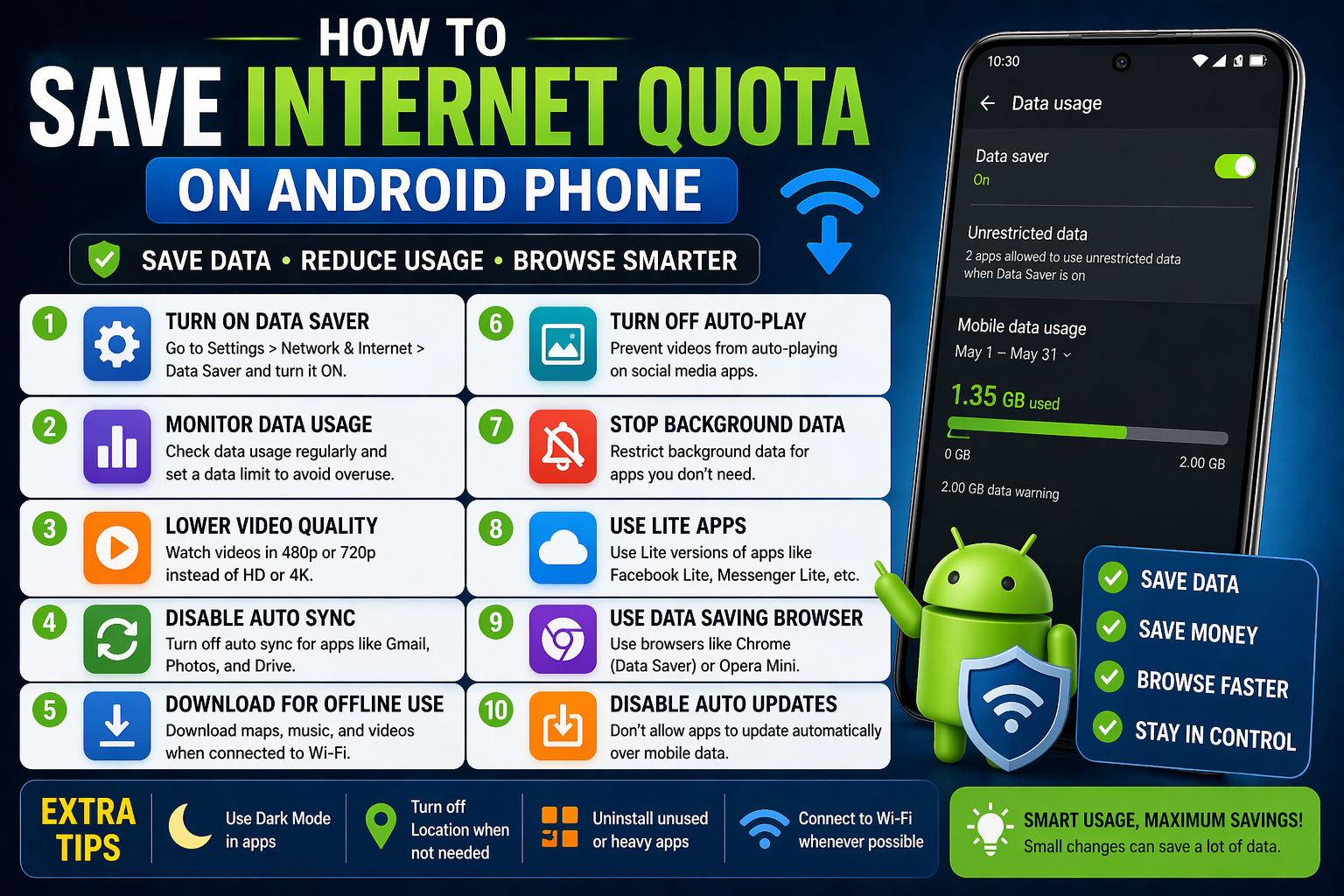
One effective way to save internet quota on your Android phone is by limiting background data. Many apps continue to operate in the background, consuming valuable data even when you’re not actively using them. To combat this, you can restrict background data for specific applications. This means you’ll be able to use apps freely when connected to Wi-Fi, but they’ll stop consuming data when you’re on mobile data unless you open them. This simple step can lead to significant savings on your data plan.
How to Limit Background Data
To limit background data, follow these easy steps: Go to Settings > Network & Internet > Mobile Network > App Data Usage. Here, you can see a list of all apps and their data usage. Select the app you want to restrict, and toggle on the Restrict background data option. By taking these measures, you’ll control how much data each app can use in the background.
Benefits of Limiting Background Data
Limiting background data not only helps save your internet quota but also extends battery life. When background apps are restricted, they won’t frequently wake up and consume battery resources. Overall, this can lead to a smoother experience with your device, as limiting unnecessary data usage optimizes your phone’s performance.
| Aspect | Restrict Background Data | Leave Background Data Unrestricted |
|---|---|---|
| Data Savings | High | Low |
| Battery Life | Improved | Decreased |
| App Performance | Optimized | Can be slow |
| User Control | More manageable | Less manageabl |
Use Data Saving Apps

If you’re looking to conserve your internet quota on your Android device, utilizing data saving apps can be a game changer. These apps work by compressing the data that is sent and received, allowing you to enjoy more browsing time without exceeding your data limit.
Popular data saving apps include Lite versions of social media platforms and browsers like Google Chrome, which feature built-in data-saving modes. By enabling these modes, you can significantly cut down your data usage while still accessing your favorite websites and applications.
Additionally, you can optimize app settings to limit background data usage. Many applications allow you to toggle off data usage when you are not actively using them. This simple action can lead to a more efficient way of using your data, keeping your quota intact for important tasks.
Adjust App Settings
To effectively save your internet quota on an Android phone, adjusting app settings is crucial. Many apps consume data in the background even when you are not actively using them. By disabling background data usage, you can significantly reduce unnecessary data consumption.
Disable Background Data
You can manage background data usage for individual apps by going to Settings > Apps. Select the app you want to restrict, then tap on Data usage and enable Restrict background data. This will help ensure that the app does not use data when you are not using it.
Limit Data Usage for Specific Apps
Another effective way to conserve internet quota is to limit data usage for specific apps that are known for high data consumption, such as social media or streaming apps. You can do this by adjusting their settings to use less data or to operate only on Wi-Fi.
Use Lite Versions of Apps
Many popular apps have “lite” versions designed to consume less data and run more efficiently on mobile networks. For instance, consider using Facebook Lite or Messenger Lite if you’re a frequent user of these platforms. They are optimized for performance and save data significantly.
Monitoring Data Usage
Regularly monitoring your data usage is essential to understand which apps are consuming the most data. You can find this option in the Data Usage section of your phone’s settings, which gives insights into your data consumption patterns.
Summary Table
| Method | Description |
|---|---|
| Disable Background Data | Prevent apps from using data in the background. |
| Limit Data Usage | Restrict data usage for high-consumption apps. |
| Use Lite Versions | Opt for lighter apps that consume less data. |
Connect to Wi-Fi Whenever Possible

One of the most effective ways to save internet quota on your Android phone is to connect to Wi-Fi whenever it is available. By using Wi-Fi networks, you can browse, stream, and download content without consuming your precious mobile data. Look for public Wi-Fi hotspots in cafes, libraries, or other accessible locations.
Additionally, it’s a good practice to connect to your home Wi-Fi network instead of relying on mobile data, especially for tasks that require large amounts of bandwidth, such as software updates or video streaming. This way, you can ensure your mobile data remains available for essential use when you are outside of Wi-Fi coverage.
Remember to turn off mobile data when you are using Wi-Fi to prevent automatic updates or background applications from consuming your data unexpectedly. This simple step can significantly contribute to extending your data quota throughout the month.
Monitor Data Usage Regularly
To effectively save your internet quota on your Android phone, it is crucial to monitor your data usage regularly. By keeping track of how much data you are consuming, you can identify which apps are using the most data and adjust your settings accordingly. Many Android devices offer built-in tools to help you with this, allowing you to set data limits and receive alerts when you approach those limits.
- How can I check my data usage on my Android phone?
- Is there an app to monitor data usage?
- Can I set a data limit on my phone?
- What should I do if I exceed my data limit?
- Are there any specific apps known for high data consumption?
Disable Auto-Updates on Apps

One effective method to conserve internet quota on your Android phone is to disable auto-updates for your apps. By default, many applications are set to update automatically whenever your device is connected to the internet, consuming significant amounts of data. To prevent this, you can adjust the settings in the Google Play Store and manage your updates manually. This way, you can choose to update apps only when you’re connected to Wi-Fi.
Additionally, keeping auto-updates disabled helps you stay in control of what gets installed on your device. Regular updates are essential for security and feature enhancements, but you can select a time that suits your data plan best. As a result, disabling auto-updates not only saves your data but also allows you to maintain control over your app environment.“Disabling auto-updates can significantly reduce data usage, granting users more control over their internet consumption.”
Choose a Suitable Mobile Plan
Choosing the right mobile plan can greatly impact your internet quota on an Android phone. It’s essential to assess your data needs and select a plan that aligns with your usage habits. Whether you stream videos, browse social media, or use GPS navigation, understanding your requirements can help you avoid overpaying for unnecessary data.
Many service providers offer various plans with different data limits and price points. When comparing these options, consider not only the price but also the quality of service and coverage in your area. A plan that seems inexpensive but has poor connectivity may end up costing you more in the long run due to productivity loss or limited usage.“Choosing the right plan is as crucial as managing your usage effectively; balance both for the best savings.”
In conclusion, an appropriate mobile plan tailored to your needs will not only save you internet quota but also contribute to overall cost savings. Always keep an eye on promotional offers or loyalty discounts from your provider to ensure you’re getting the best deal available.
We hope these tips help you maximize your data usage without overspending. Until next time, stay connected and informed!
Thank you for reading! For more tips, read other interesting articles.